TTn-System · SignDeck
Digital signage manager
SignDeck manages what goes out to your screens: promotions, menus, news, opening hours, internal information. You put it together in a browser; the display plays it by itself.
- Put the content together in a browser, in minutes
- The display plays it by itself, unattended – no internet needed
- One screen needs no server; for many there is a controller where all of them are visible
Use cases
What is SignDeck good for?
For places where something has to be shown on a screen, and that something changes often – and you do not want to walk over with a USB stick or reprint a poster every time.
Promotions and offers
In the shop window and on the sales floor: offers, products, video ads. Tomorrow's price goes in tonight and runs in the morning – no printing, no poster swapping.
Information
At reception, in waiting rooms and public offices: opening hours, news, weather, current announcements. Always today's state, not last year's printout.
Menus and price lists
In restaurants, cafés and bakeries: menu, prices, daily specials. It switches from breakfast to lunch on schedule, by itself.
Internal communication
In plants, warehouses and offices: shift information, safety notices, production figures, live camera views. In an emergency, one message reaches every screen at once.
What it does
What can the software do?
Anything that belongs on a screen
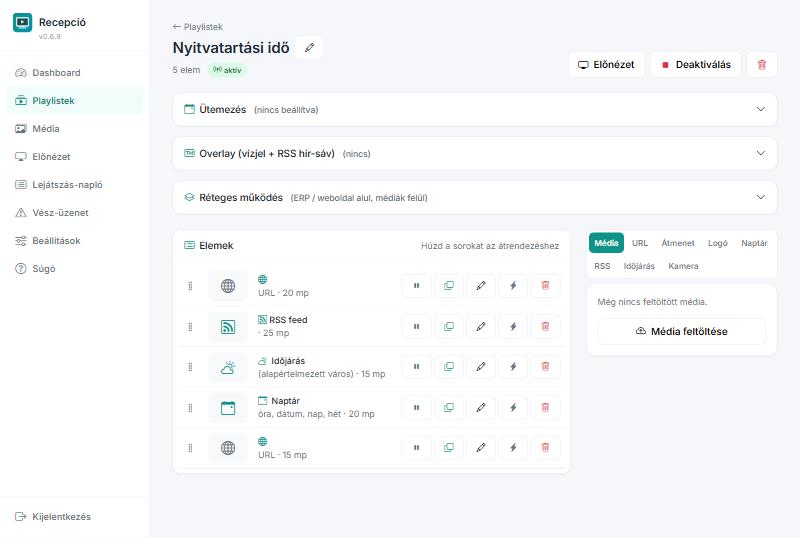
Images, video, web pages, news feeds, weather, calendars and live IP cameras – in one list, each with its own duration and position. YouTube and Vimeo links become playable embeds automatically.
One, two or many monitors
Mirroring, different content per monitor, or a video wall: the monitors form one large screen and the image stretches across them. Placement is set on a diagram.
It looks after itself
It watches memory, temperature and itself. If the browser crashes it restarts it; if an automatic system update breaks it, it tries to repair itself. Disruptive operations wait for the maintenance window.
It does not only show – it switches
With a USB relay board it switches a gate, a siren or shop-window lighting: tied to a playlist item, to an emergency message, or by time of day.
An emergency message that really gets through
One text on every display immediately, above the content. The matching relay (siren, beacon) switches independently of the browser – so it sounds even when something is wrong with the screen.
Two parts
A single display needs no server
The SignDeck Display is fully functional on its own: you put the content together in its own browser interface. The Controller is not a requirement but an option – it pays off with several sites or many displays.
The machine that draws on the monitor
The small computer next to the screen. Managed from a browser, and capable of everything on its own.
- Playlists, media, scheduling
- Preview: what it is showing now
- Monitor layout, video wall
- Relays, cameras, emergency message
- Play log (proof-of-play)
The place where all of them are visible
Content, status and settings of many displays in one interface. Displays connect outbound, so sites behind a firewall work too.
- Content assignment, transcoded video
- Fleet profiles across machines
- Alerts for offline and dead screens
- Remote reboot, screenshot, logs
- Signed updates for the fleet
Three steps
How does it work?
- Install. Unpack the package, start the installer, and it asks for what it needs, in order. At the end the machine starts on the display by itself.
- Content. Put the list together from a browser: images, video, web pages, news feeds. Preview shows what the player sees.
- Done. From then on the display runs by itself: it starts after power-on, watches itself, and repairs itself when needed.
What it needs
System requirements
| Component | Machine | Operating system |
|---|---|---|
| SignDeck Display | x86-64 or Raspberry Pi | Ubuntu Server |
| SignDeck Controller | x86-64 | Ubuntu Server |
The display needs an HDMI monitor or TV, and a network. The controller needs no monitor – it is enough that the displays can reach it.
Availability
How can you get it?
SignDeck is not sold in retail. It is available exclusively through TTn-System, as an individual arrangement: we carry out the installation and commissioning.
Stuck?
The Help has screenshots: content, monitors, relays, cameras, troubleshooting. The same help is built into the program, in Hungarian and English.
Write to us
Contact
Do you have a question, or would you like to use SignDeck? Write to us and we will get back to you soon.
- Tamás Szabó
- info@ttn.hu
- Mikes utca 41, 3000 Hatvan, Hungary